🎓 Whether you’re writing assignments, studying for exams, or working on your final thesis, these free AI tools can save time and boost your results. Here’s what every student should be using in 2025:
1. ChatGPT by OpenAI
📚 Ask questions, get explanations, or outline essays in seconds
🧠 Perfect for learning concepts and brainstorming ideas
💡 Tip: Use it to improve your writing or summarize tough topics 🔗 chat.openai.com
2. Grammarly AI
✍️ Grammar, spelling, and tone checker with real-time feedback
📄 Works in Google Docs, Word, browsers
💡 Free version is enough for most students 🔗 grammarly.com
3. Scite.ai
🧪 Find credible, peer-reviewed papers with “Smart Citations”
🔍 Ideal for research essays, thesis, PhD literature review
🧠 Shows how papers are cited — supports critical thinking 🔗 scite.ai
4. Notion AI
📋 Organize notes, generate to-do lists, summarize readings
✨ AI assistant writes, edits, and brainstorms inside Notion
🎓 Great for project planning and collaborative work 🔗 notion.so
5. Scholarcy
📄 Upload any research paper → Get a short summary with key points
🎓 Amazing for reviewing PDFs and journal articles quickly
Top 10 Free AI Tools to Create Videos and Reels in 2025
📲 Creating content for YouTube Shorts, Instagram Reels, or TikTok no longer requires expensive software. Here are the best free AI-powered video creation tools you can use in 2025 — perfect for students, educators, marketers, and creators.
1. Pictory AI
📌 Auto-generates short videos from text or blog articles
Recently, security researcher Johann Rehberger uncovered a vulnerability in ChatGPT’s memory feature, which allowed attackers to store false information and harmful instructions in a user’s long-term memory settings. Despite this discovery, OpenAI initially dismissed it as a safety issue rather than a security threat.
Refusing to back down, Rehberger demonstrated how this vulnerability could be exploited by creating a proof-of-concept (PoC) that extracted all user input continuously. This caught OpenAI’s attention, prompting them to release a partial fix earlier this month.
The Vulnerability Exploited Memory Features
The flaw involved ChatGPT’s long-term memory feature, introduced in February and expanded in September. This feature allows ChatGPT to remember details like a user’s preferences and past conversations, making future interactions smoother. However, Rehberger found that attackers could abuse this feature through indirect prompt injection—a technique that makes the AI follow instructions from untrusted sources such as emails or blog posts.
Using this method, Rehberger demonstrated how he could manipulate ChatGPT into permanently storing false information. For instance, he made the AI believe a user was 102 years old, lived in a fictional world, and believed Earth was flat. These fabricated details then influenced all future conversations.
The attack didn’t stop there. Rehberger also showed how malicious files hosted on platforms like Google Drive or Bing could be used to plant these false memories, making the flaw a real threat.
OpenAI’s Response and Ongoing Risks
Rehberger reported the issue to OpenAI in May, but the company initially closed the case. A month later, after submitting a more detailed report and PoC, OpenAI engineers took action. His PoC revealed that by tricking ChatGPT into viewing a malicious web link, all user interactions could be copied to a server controlled by the attacker. This was especially concerning because the data exfiltration persisted across multiple sessions.
While OpenAI has fixed part of the problem by preventing memory abuse for data exfiltration, Rehberger noted that prompt injections can still be used to plant long-term false information.
Staying Safe
To avoid these types of attacks, users should be cautious when new memories are added during sessions and regularly review stored memories for anything unusual. OpenAI offers tools for managing and reviewing these memories, but the issue of prompt injections still lingers.
Stay informed on security updates and other tech insights at brightmindai.com!
Discover How ChatGPT Can Help You Brainstorm with Just 3 Simple Steps!
Picture this: you’re facing a challenge, whether it’s coming up with fresh marketing ideas, expanding your product range, or finding creative ways to celebrate your company’s anniversary. Typically, you might gather a group of individuals in person or on a Zoom call for a brainstorming session to tackle these kinds of issues.
However, despite various techniques and approaches to optimize these meetings, conventional brainstorming may not always be effective. Research shows that many people may feel too reserved or overly confident to share their wildest ideas in front of their colleagues.
But what if there was a solution that would help you unlock the full potential of your brainstorming sessions? Introducing ChatGPT – a cutting-edge AI tool that can help you generate fresh, original ideas with just a few clicks. With ChatGPT, you can say goodbye to the limitations of traditional brainstorming and unlock a world of unlimited creativity.
Have you ever wished for a brainstorming partner who never shies away from sharing unusual ideas?
Well, now you can turn to AI-driven chatbots for creative inspiration. Despite their tendency to produce dull or outrageous ideas, these tools can be an invaluable asset during the idea-generation phase of the creative process.
And with advanced chatbots like ChatGPT-4, their potential for boosting your productivity and creativity is limitless. Many marketers, creators, and makers have already shared their tips and tricks for using this technology to their advantage. One such approach is outlined by Reece Rogers in a recent Wired essay.
1. Decide on your key issue
Rogers recommends starting with a clear understanding of the issue or concept you’re exploring. While brainstorming should encourage unexpected paths, having a strong premise is essential for productive idea generation. So, step one is to define your key problem or topic. With ChatGPT by your side, you’ll have an AI brainstorming buddy that’s always ready to help you tackle any challenge.
2. Be Persistent
Persevere Artificial intelligence (AI) shares a key trait with human intelligence – it often defaults to the most obvious solutions. However, the goal of using AI for brainstorming is to break through those conventional ideas and reach more innovative concepts. Achieving this might require persistence on your part.
3. Request Lists
According to Reece Rogers, one way to push past the initial ideas is to repeatedly ask the chatbot the same question while making slight modifications to it. The more questions you ask, the more likely the chatbot will generate unusual or valuable responses. You can also delve deeper into a concept by requesting further background information. And if things get too strange or unsettling, don’t hesitate to start a new session.Request Lists When it comes to brainstorming, quantity is key. While most ideas may be impractical or far-fetched, having a large pool of suggestions usually leads to more creativity and better results. That’s where your AI brainstorming partner comes in handy – you can ask for lists of ideas on a particular topic. With ChatGPT’s vast knowledge and vocabulary, you’re sure to receive plenty of diverse and unexpected proposals
“While a chatbot’s responses may seem formulaic and uncreative at times, you never know what gems you might uncover if you peruse multiple lists from the bot,” recommends Rogers. She also suggests explicitly requesting lists of odd or imaginative ideas if the bot’s initial suggestions don’t inspire you.
The chatbot’s responses can sometimes be quirky or amusing, but research shows that humor can help relax us and stimulate our idea flow. So, even the most offbeat suggestions might prove useful.
The potential applications of these technologies for businesses and professionals are still largely unexplored. However, that doesn’t mean you can’t start using them today as a brainstorming companion to shift your perspective and generate innovative solutions for common challenges.
Create a working presentation, document or webpage you can refine and customize in under a minute, using our powerful AI generator.
Bring your ideas to life
Move beyond walls of text and boring clipart. Embed anything: ⏰GIFs ⏰Videos ⏰Charts ⏰Websites Your audience will pay more attention and stay engaged with your content.
Present live, or send a webpage
⏰Get your point across with present mode ⏰ Drill into the details using nested cards ⏰ Share online with publishing + analytics
Make it polished and ready in one click
⏰No more slide masters or template lock-in ⏰Restyle your entire deck in just one click ⏰ Use a flexible template to work faster
Read anywhere
⏰Measure engagement with built-in analytics ⏰Get more feedback with quick reactions ⏰Comments make collaboration straightforward ⏰Share on any device — laptop, tablet, or phone
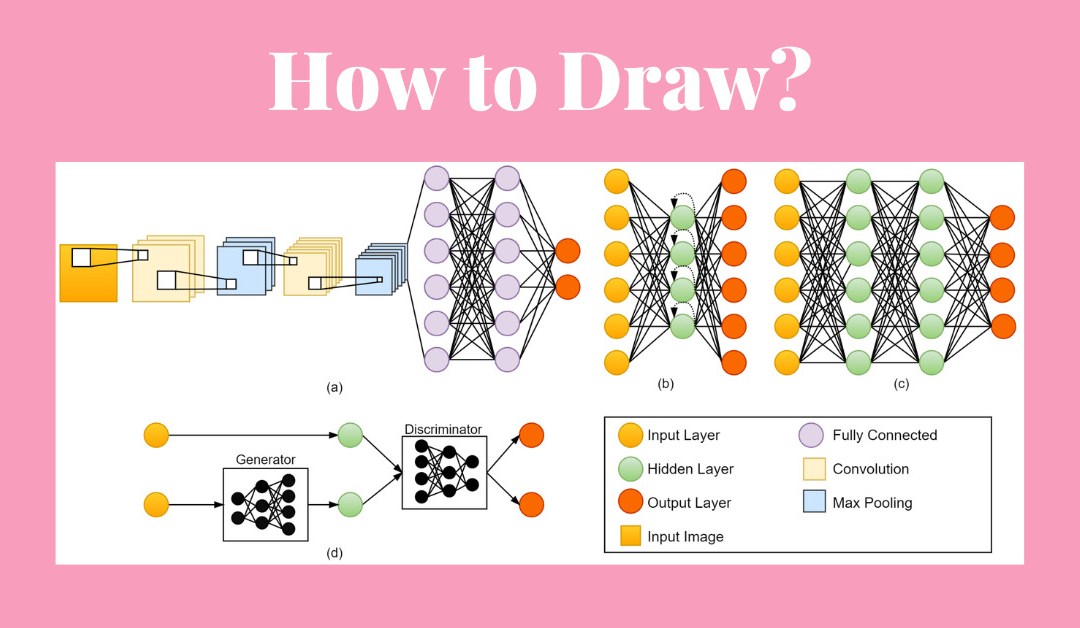
How to draw Neural Network Figures using online tools.
There are many tools that can help you build figures, hwoever some interesting tools are here to help you build more better images in less time.
Please find the tools below:
The tool NN SVG allows users to input a neural network’s architecture (i.e., the number of layers, the number of neurons in each layer, and the connections between them) and then generates a visual representation of the network. The visualization consists of interconnected nodes (representing neurons) and arrows (representing the connections between them).
The color of the nodes can also be used to represent different types of neurons, such as input, hidden, or output neurons. The tool also allows users to adjust the size and spacing of the nodes, as well as the thickness of the arrows, making it easier to visualize and understand the network.
Overall, the tool is useful for researchers and practitioners in the field of machine learning who want to better understand how neural networks operate and how changes to their architecture can affect their performance.
Plot Neural Net link that provides high defination figure, which is a tool for visualizing neural networks using LaTeX.
The package provides a simple syntax for defining the architecture of a neural network using a set of customizable commands. The output is a high-quality vector graphic that can be easily integrated into academic papers or presentations. An example of the image provides below.
The package supports a range of different types of layers, including convolutional layers, fully connected layers, pooling layers, and activation functions. The user can also specify the size and spacing of the layers and adjust the color and style of the arrows connecting them.